A useful prefabricated substation inquiry starts with the project requirements, not just a photograph or a requested enclosure size. The information below helps a supplier understand the equipment arrangement and identify questions before preparing a quotation.
Start with the installation and supply scope
Describe the application: a residential development, industrial facility, utility node or another installation. State whether the inquiry covers a complete packaged arrangement or only selected equipment. Make the boundaries clear between the enclosure, switching equipment, transformer, low-voltage distribution and any work provided by other parties.
If your project already has an approved specification, attach it and identify the revision. A short scope summary helps prevent different suppliers from quoting different packages.
Treat the supply boundary as a document to agree, not a standard inclusion implied by the term prefabricated substation. An inquiry may concern the enclosure alone, selected electrical assemblies, or an integrated equipment package. Identify the requested arrangement first, then ask CANGO to state what its proposal includes. Use a separate column for equipment or work provided by the customer, contractor or another supplier. An unassigned item remains an open question rather than automatically belonging to either party.
The boundary also has a physical location. For incoming power, describe the terminal at which the supplier responsibility begins; for outgoing distribution, identify where it ends. Name the party responsible for the connecting cable, its supports and terminations. Apply the same approach to foundations, external earthing connections, site installation and commissioning. These interfaces affect the package even when they are outside the equipment quotation.
A useful scope review follows the circuit from the incoming connection through switching, transformation and outgoing distribution. It then follows auxiliary power, control signals and enclosure services. Mark any equipment supplied free of charge to the assembly supplier and state who checks its compatibility. The following allocation is a quotation worksheet to complete with the parties; it is not a statement that CANGO always includes or excludes these items.
| Scope item | Requested from CANGO | Customer/other-party interface |
|---|---|---|
| Enclosure and internal assemblies | List the enclosure and assemblies to be quoted | Confirm foundations, site dimensions and external services. |
| Transformer and switchgear | Identify included equipment and configuration documents | Identify any separately purchased equipment and integration responsibility. |
| External connections | Define the exact included termination boundary | Allocate incoming/outgoing cables, site earthing and connection work. |
| Site activities | Request a written list of included services | Allocate installation, commissioning and required project approvals. |
Prepare the electrical information
- Incoming and outgoing voltage requirements, frequency and phases.
- Required transformer capacity or the available load schedule for review.
- Single-line diagram showing incoming feeders, outgoing circuits and metering points.
- Protection, control and auxiliary supply requirements from the project specification.
- Applicable utility requirements and requested technical documentation.
Mark items that have not yet been confirmed. A quotation based on provisional information should identify those assumptions so they can be resolved before an order.
Build an electrical schedule with three distinct states: confirmed requirements, provisional design information and items awaiting supplier review. Give the source document or responsible engineer for each requirement. This avoids turning a preliminary value copied into an email into an apparently approved specification. The schedule should distinguish the network nominal voltage from the required equipment rating and should identify the required transformer voltage combination without assuming that every available catalog combination is suitable.
Capacity should be related to the project load assessment, while switching duties should come from the installation design and available network fault information. A transformer capacity does not establish the short-circuit duty of every connected assembly. Similarly, an incoming current value does not define the number or function of outgoing circuits. Put these requirements in separate rows and attach the single-line diagram that explains their relationship.
Where utility requirements specify metering, protection or control interfaces, include the actual requirement or referenced document. Record its revision and identify any conflict with the equipment schedule. Ask the supplier to flag deviations instead of resolving them silently. If essential information is missing, request an indicative configuration with explicit assumptions and a list of information needed before the configuration can become firm.
| Electrical item | Information to enter | Review responsibility |
|---|---|---|
| Voltage and frequency | Incoming supply, transformer voltage combination and outgoing system | Confirm against utility and project requirements. |
| Capacity and circuits | Load schedule, transformer requirement and outgoing feeder functions | Project engineer confirms the design basis. |
| Fault duty | Available fault information and specified equipment withstand duties | Review each relevant assembly and protection interface. |
| Auxiliary/control systems | Required supply, signals, protection and metering scope | Identify the specification and integration owner. |
Describe the site
Provide a location plan, available footprint and installation conditions. Include access for delivery, the proposed cable entry arrangement and the space available for operation and maintenance. State any known temperature, altitude, coastal exposure or enclosure requirements instead of assuming a standard configuration will suit every location.
Drawings are particularly useful where the enclosure must fit existing foundations or where doors, cable trenches and surrounding structures restrict the arrangement.
Use a site information sheet to connect the equipment outline to the installation. Begin with the intended location and available footprint, then identify adjacent walls, fences, roads and equipment. Mark the proposed operating faces and cable routes. A footprint that accommodates the enclosure can still leave insufficient room to open doors, terminate cables or replace equipment, so those activities should be represented on the layout rather than left to a general note.
Describe the delivery route separately from the permanent installation position. State restrictions at gates, turning areas, access roads and lifting locations, and identify who surveys these constraints. Ask for the proposed shipping arrangement when it affects handling. Do not substitute an estimated lifting weight or a generic foundation drawing for the confirmed information for the selected equipment. Final lifting, support and installation instructions must be checked against manufacturer documentation.
For ventilation and earthing, describe the interfaces and requested documents rather than designing them from a photograph. Identify whether the enclosure uses natural ventilation or specified environmental-control equipment and who confirms the surrounding installation conditions. Show where the external earthing arrangement connects to the package. The project design must coordinate this interface with local requirements; an internal earth bar is not proof that the external installation has been designed.
| Site check | Record in the inquiry | Evidence to attach |
|---|---|---|
| Access and handling | Delivery route, lifting position and known restrictions | Annotated plan and relevant site photographs. |
| Foundation and cables | Support arrangement, cable trenches and entry positions | Current civil/layout drawings with interfaces identified. |
| Environment and ventilation | Exposure and specified service conditions | Project environmental specification and room/enclosure arrangement. |
| Operation and earthing | Operating space and external earth connection boundary | Layout and earthing-interface requirements for review. |
Compare quotations on the same basis
| Item | What to check |
|---|---|
| Equipment scope | Included assemblies, accessories and exclusions. |
| Technical configuration | Agreed ratings and the current drawing revision. |
| Documentation | Requested drawings and the applicable verification documents. |
| Delivery scope | Destination, packaging, delivery terms and responsibilities. |
Compare the scope line by line before comparing totals. Create a common response sheet covering each requested assembly, accessory, document and service. Ask every supplier to use the same drawing revision and to identify alternatives separately. A lower quotation may reflect a different transformer selection, fewer fitted circuits, a different enclosure scope or omitted site services. Those differences should be visible in the comparison rather than hidden in a general statement of compliance.
Keep the offered technical arrangement next to the requirement. Where a proposal is provisional, state what must be confirmed and whether the unresolved item affects the equipment outline or interfaces. Treat an alternative as a distinct technical option, with its own deviations and consequences. Do not combine the price of one configuration with the performance schedule of another when preparing the purchasing comparison.
Finish the comparison with a reconciliation meeting or written clarification record. The outcome should identify the accepted scope, excluded work, open design questions and documents required before manufacturing. Record which revision supersedes earlier correspondence. Commercial comparison can then proceed with a clear understanding of what each offer represents, rather than assuming that matching project names mean matching equipment packages.
| Comparison row | Requirement/reference | Supplier response to obtain |
|---|---|---|
| Included equipment | Common equipment and circuit schedule | Exact included assemblies, quantities and exclusions. |
| Technical arrangement | Agreed specification and drawing revision | Offered ratings, deviations and alternatives. |
| Documents and services | Required deliverables and responsibility schedule | Included documents, site scope and outstanding approvals. |
| Unresolved interfaces | Assumptions register | Effect on configuration and information needed to close the item. |
Send a focused inquiry to CANGO
Start with the drawing, equipment list, quantity and destination. Our team can discuss the available configuration and the information needed to define the quotation. Final equipment selection and installation requirements must be confirmed for the project.
Explore prefabricated substations or see our building distribution application guide.
Organize the inquiry so a reviewer can find the current information without reconstructing a long email chain. Put the project description, equipment list, quantity and destination in a short cover sheet. Attach the single-line diagram, electrical schedule, site layout and relevant utility or customer specification. Give documents consistent names and revisions, and state which file takes precedence if two documents disagree.
Use a question register for missing information. Each entry should explain the unresolved decision, the party expected to answer and the quotation assumption permitted in the meantime. For example, if the final outgoing feeder schedule is unavailable, say that it remains provisional rather than presenting a preliminary circuit count as final. Ask the response to identify whether the uncertainty affects only component selection or also the enclosure arrangement and supply boundary.
A focused request can be detailed without claiming the design is complete. Explain what type of response is needed now: a discussion of equipment families, an indicative budget configuration, or a quotation against an approved schedule. Keep commercial requests separate from technical facts, and ask for confirmation of project-specific terms directly. None of the example documents below establishes a standard price, delivery period or minimum order quantity.
| Document | Purpose | Status to show |
|---|---|---|
| Cover sheet | Application, requested package, quantity and destination | Identify inquiry contact and response scope. |
| Electrical package | Single-line diagram and required equipment duties | Mark confirmed and provisional requirements. |
| Site package | Location, available space and installation interfaces | Mark drawing revision and unverified dimensions. |
| Clarification register | Open questions, assumptions and exclusions | Identify who confirms each outstanding requirement. |
Separate an indicative budget from a defined equipment quotation
At an early project stage, send the information already available and identify the decisions still open. A supplier can discuss the equipment scope without treating every preliminary assumption as a final requirement. Keep an assumptions register with the drawing revision, responsible party and information needed to close each item. Update that register when the incoming supply, transformer requirement or outgoing circuit schedule changes.
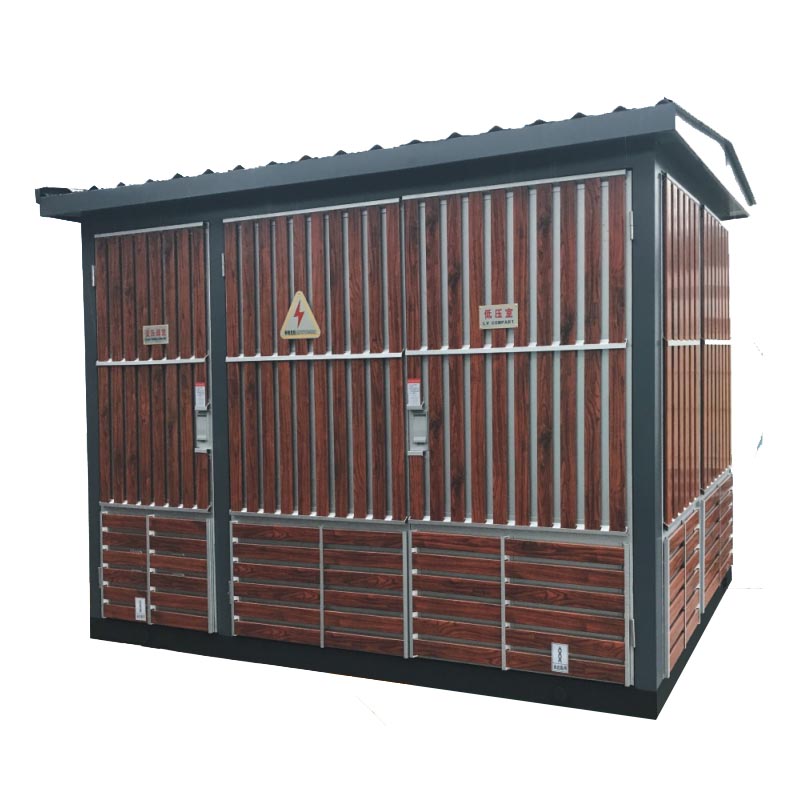
For a complete substation, compare the package at its interfaces. Check where the incoming cable terminates, where the outgoing connections begin and which party provides external cables, foundations and site installation. State whether metering and auxiliary supplies are part of the equipment package. A complete-looking enclosure photograph does not show these contractual boundaries.
For replacement projects, distinguish information copied from the old nameplate from requirements for the new installation. Send the existing layout and explain any change in load or supply arrangement. Existing foundation dimensions, cable positions and access restrictions should be treated as interfaces to review, rather than proof that a new enclosure can be installed without modification.
Consider an illustrative inquiry for a building distribution project in which the incoming supply arrangement is known but the final load schedule and site layout are still being reviewed. The buyer can request a budget discussion around a stated equipment concept. The response should identify provisional capacity, circuit and enclosure assumptions without presenting those assumptions as approved project data. This example describes a decision process and does not specify any actual project rating or commercial offer.
Later, the buyer issues an approved single-line diagram, a confirmed electrical schedule and coordinated installation drawings. The supplier can then prepare a more defined offer against that identified revision. Compare the new offer with the earlier budget on scope and configuration before interpreting a change in the quoted amount. A change in included equipment or supply responsibility is not simply a price movement for an unchanged package.
The transition should be documented. Replace assumptions with confirmed requirements, close interfaces with the relevant project parties and retain a clear deviation list. Any decision still open remains explicit. This prevents procurement, civil design and equipment manufacturing from progressing on different versions of the same project. Manufacturer data must confirm the selected equipment arrangement before it is treated as a final installation basis.
| Quotation stage | Available basis | Appropriate interpretation |
|---|---|---|
| Indicative budget | Provisional equipment concept with identified gaps | A planning input subject to stated assumptions. |
| Defined equipment offer | Identified schedule, scope and drawing revision | A comparison basis for the offered configuration and exclusions. |
| Manufacturing release | Accepted configuration and coordinated interfaces | A documented approval step, distinct from the initial budget request. |
Inquiry review checklist
| Review area | Information to provide | Decision to confirm |
|---|---|---|
| Electrical design | Current single-line diagram and equipment schedule | Identify provisional ratings and who confirms them. |
| Physical interfaces | Foundation, cable route, access and room/site plan | Identify constraints affecting arrangement and delivery. |
| Supply responsibility | Equipment and work by each party | Separate included items, exclusions and site work. |
| Quotation comparison | Same revision and assumptions sent to each supplier | Resolve scope differences before comparing prices. |
Before accepting a proposal, request a consolidated list of deviations and open points. Read it alongside the equipment schedule and general arrangement drawing. Confirm what must be agreed before manufacturing and what remains a site responsibility. Record the final revision in the order documentation so later discussions do not rely on superseded inquiry drawings.
Related reading
- Prefabricated vs Packaged vs Compact Substation: Terminology Guide
- European-Type vs American-Type Box Substation: Which Should You Specify?
FAQ
Can I request a quotation before the design is complete?
Yes. Send the available drawing, equipment list, quantity and destination, and mark unresolved items as provisional. Ask the proposal to state its assumptions and the information needed before a final configuration can be confirmed.
Does a prefabricated substation quotation include site works?
The scope must be agreed explicitly. Identify whether foundations, external cables, installation and other site work are included or provided by other parties. Do not infer these responsibilities from the enclosure or product name.
Is a photograph enough to specify replacement equipment?
A photograph helps explain the installation, but it does not replace the single-line diagram, nameplate information, dimensions and cable interfaces. Explain any change in the intended duty or load as part of the replacement inquiry.
What should be compared before price?
Compare equipment scope, confirmed ratings, drawing revisions, documentation and delivery responsibilities. Resolve differences in assumptions and exclusions so the offers describe the same project requirement.
When should the equipment arrangement be finalized?
Agree the configuration and relevant project drawings before manufacturing. Keep a record of the accepted revision and close provisional interfaces with the responsible project parties.
References
- CANGO Power, Prefabricated Substations Portfolio (CANGO product category information).